
WiFi is an essential technology we use every day, from browsing the web on our phones to streaming movies on our TVs. But have you ever wondered how WiFi works? At its core, WiFi is a way to transmit data wirelessly, using radio waves to carry information between your device and the internet. It’s like a two-way radio system, constantly sending and receiving signals. Let’s break it down step by step.
The Basics of WiFi: How Data Travels Wirelessly
When you connect to WiFi, your device is essentially communicating with a router through radio waves. Here’s how the process works:
Your Device Sends a Signal – When you want to access the internet, your device’s wireless adapter (the built-in component that allows you to connect to WiFi) takes the data you want to send—whether it’s a request for a web page, a video, or a game update—and converts it into a radio signal. This signal is then transmitted through an antenna on your device.
The Router Receives and Forwards the Signal – A nearby router, which acts as the central hub of your wireless network, picks up this radio signal. The router then decodes the signal to understand the data you’re asking for and sends that information through a physical (wired) connection to the internet—often using fiber-optic or cable lines.
The Reverse Process: Data Comes Back – Once the router receives the requested information from the internet, it goes through the reverse process: the router converts the internet data into a radio signal and sends it back to your device, allowing you to access websites, videos, apps, and more. Your device picks up this signal and turns it back into readable data.
Understanding WiFi Signals: Frequency and Range
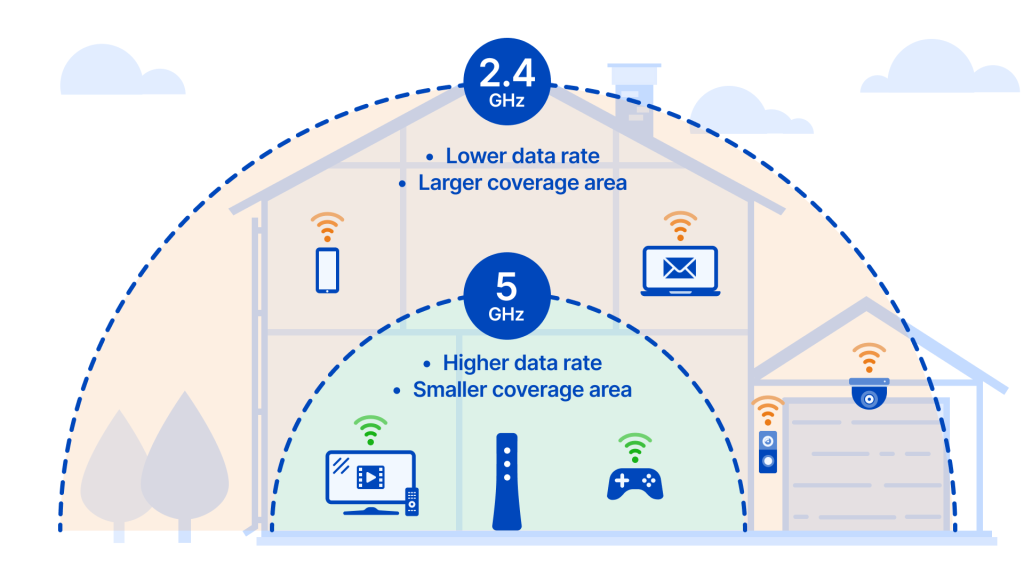
WiFi signals operate using specific radio frequencies, which can affect speed and range. The two main frequency bands used for WiFi are 2.4 GHz and 5 GHz. Let’s take a closer look at each:
2.4 GHz – This frequency band has been around for a long time and is known for its ability to cover larger areas. However, it comes with trade-offs. The 2.4 GHz band is slower and more prone to interference from other devices that use the same frequency, like microwaves or cordless phones.
5 GHz – The 5 GHz band, on the other hand, offers faster speeds and less interference. But it has a downside—its range is shorter, and it can have difficulty passing through obstacles like walls or floors.
Advancements in WiFi Technology: WiFi 6 and WiFi 7
The evolution of WiFi technology has brought improvements in speed, efficiency, and range. Some of the most recent advancements are in WiFi 6 (802.11ax) and the upcoming WiFi 7 (802.11be). These new standards are designed to handle more devices simultaneously, offering faster data transfer speeds and reducing congestion, especially in crowded areas like apartment buildings or coffee shops.
WiFi 6 offers better overall performance, even in environments with many connected devices. It also improves battery life for devices like phones and laptops.
WiFi 7 promises even higher speeds, better support for video streaming, and smoother online gaming, making it an exciting advancement for the future of wireless connectivity.
Connecting to a WiFi Network: The Role of the Router
To access WiFi, your device needs a wireless adapter (like the built-in WiFi card on most modern phones and laptops). The router, which is usually connected to a broadband modem, manages all the devices in the network. Once your device detects the router’s signal, it connects, and the router assigns it a specific IP address to manage data traffic between devices and the internet.
The router’s job doesn’t stop there. It also manages how information is shared across devices, making sure each device gets a fair share of the connection speed and preventing network congestion. The router keeps the connection stable by ensuring that data packets are sent and received in the right order.
WiFi Security and Optimization
WiFi networks, like any communication network, require security to prevent unauthorized access. There are different methods to secure your WiFi connection, including encryption protocols like WPA2 and WPA3, which scramble the data to prevent hackers from intercepting it.
WPA2 is a widely-used standard that ensures strong security for most home networks.
WPA3 is the newer, more secure standard, which improves protection against brute-force attacks and offers better encryption for newer devices.
For additional security, you can use features like MAC address filtering (which only allows certain devices to connect) and hidden SSIDs (which makes your WiFi network invisible to unauthorized users).
To ensure your WiFi network performs at its best, it’s also important to optimize its setup. For example:
Router placement: Positioning your router in a central location, away from walls and large metal objects, can help extend the range and improve signal strength.
Minimize interference: Other electronic devices, such as microwaves, baby monitors, and even other WiFi networks, can cause interference. By minimizing these interferences or choosing the least crowded channels, you can ensure a stronger signal.
The Future of Wireless Connectivity: WiFi’s Growing Potential
WiFi technology is constantly evolving, and the future looks promising. New standards like WiFi 7 aim to deliver faster speeds, more reliable connections, and better coverage across more devices. This will enable innovations such as smarter homes with seamless connectivity, high quality virtual and augmented reality experiences, and ultra fast gaming.
In summary, WiFi is a fascinating technology that uses radio waves to deliver high-speed internet to our devices. With new advancements on the horizon, the future of WiFi looks faster, more efficient, and more accessible than ever before.